This guide is for new employees, developers, and Paperclip agents joining the Renteric project. It explains what the product does, how the application is architected, where to make changes, and how work should move through issues.
1. Product Context
Renteric is an Argentina-first rental operations SaaS for small landlords, boutique property managers, and real estate agencies. The product centralizes:
- Properties, buildings, units, owners, tenants, guarantors, and leases.
- Invoices, payment collection, manual payment review, expenses, owner settlements, and reports.
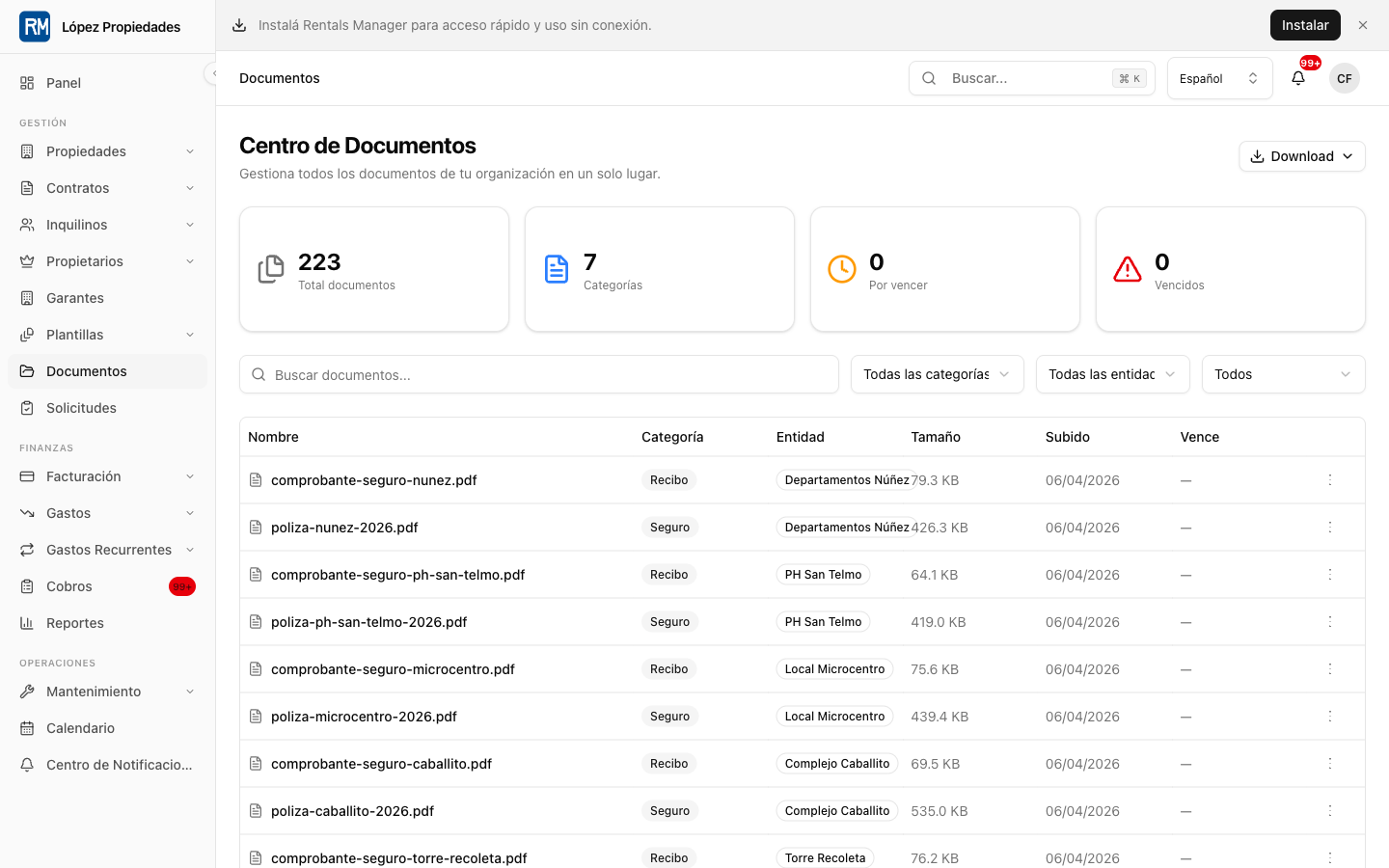
- Maintenance, vendors, inspections, messages, notifications, and documents.
- Tenant, owner, prospect, public listing, and internal admin surfaces.
- Argentina-specific workflows such as MercadoPago, ARCA/AFIP, BCRA indices, local tax reports, Spanish/English localization, and ARS-first pricing.
The product promise is automatic rental management: fewer spreadsheets, WhatsApp threads, manual reminders, duplicated records, and owner-reporting loops.
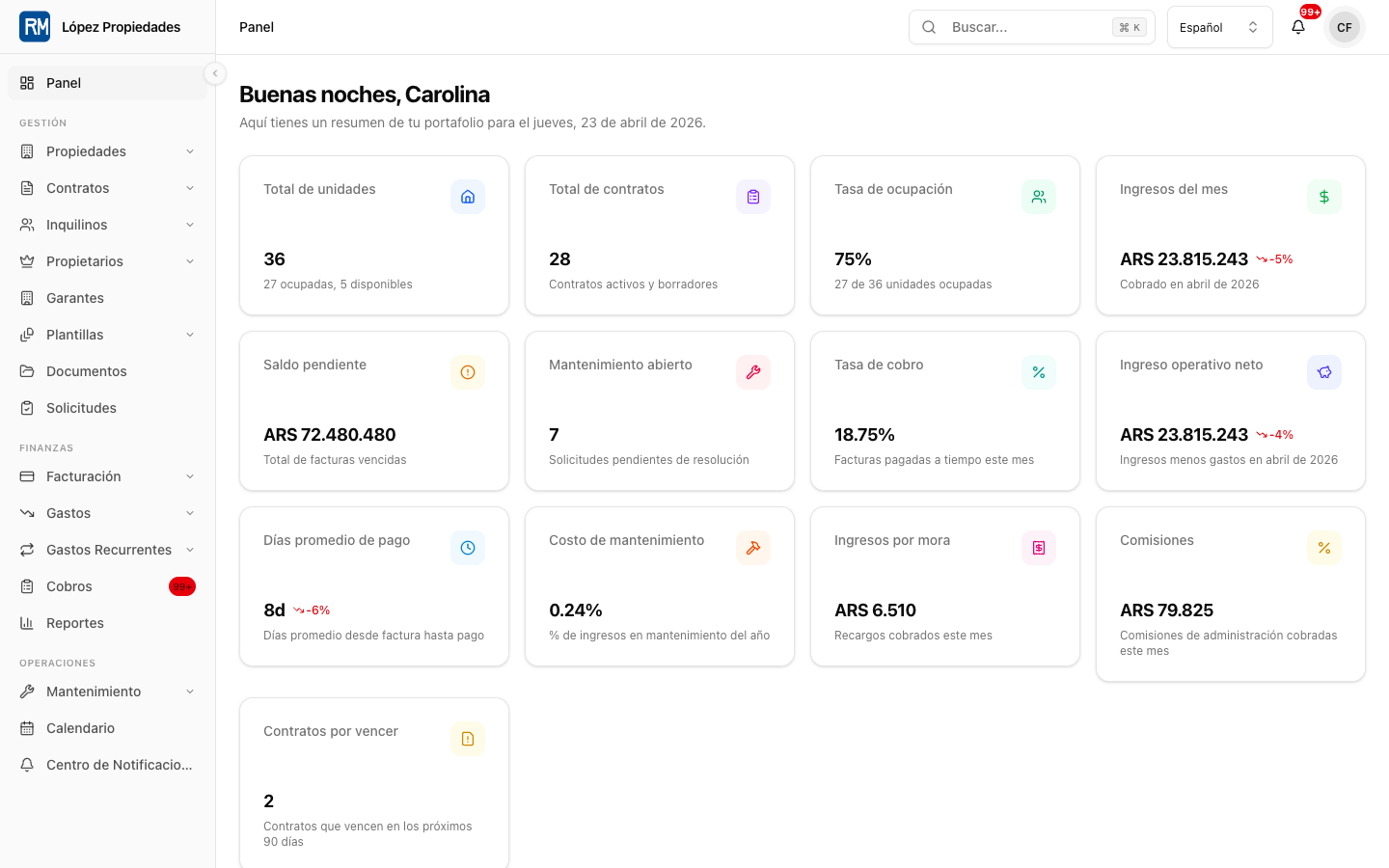
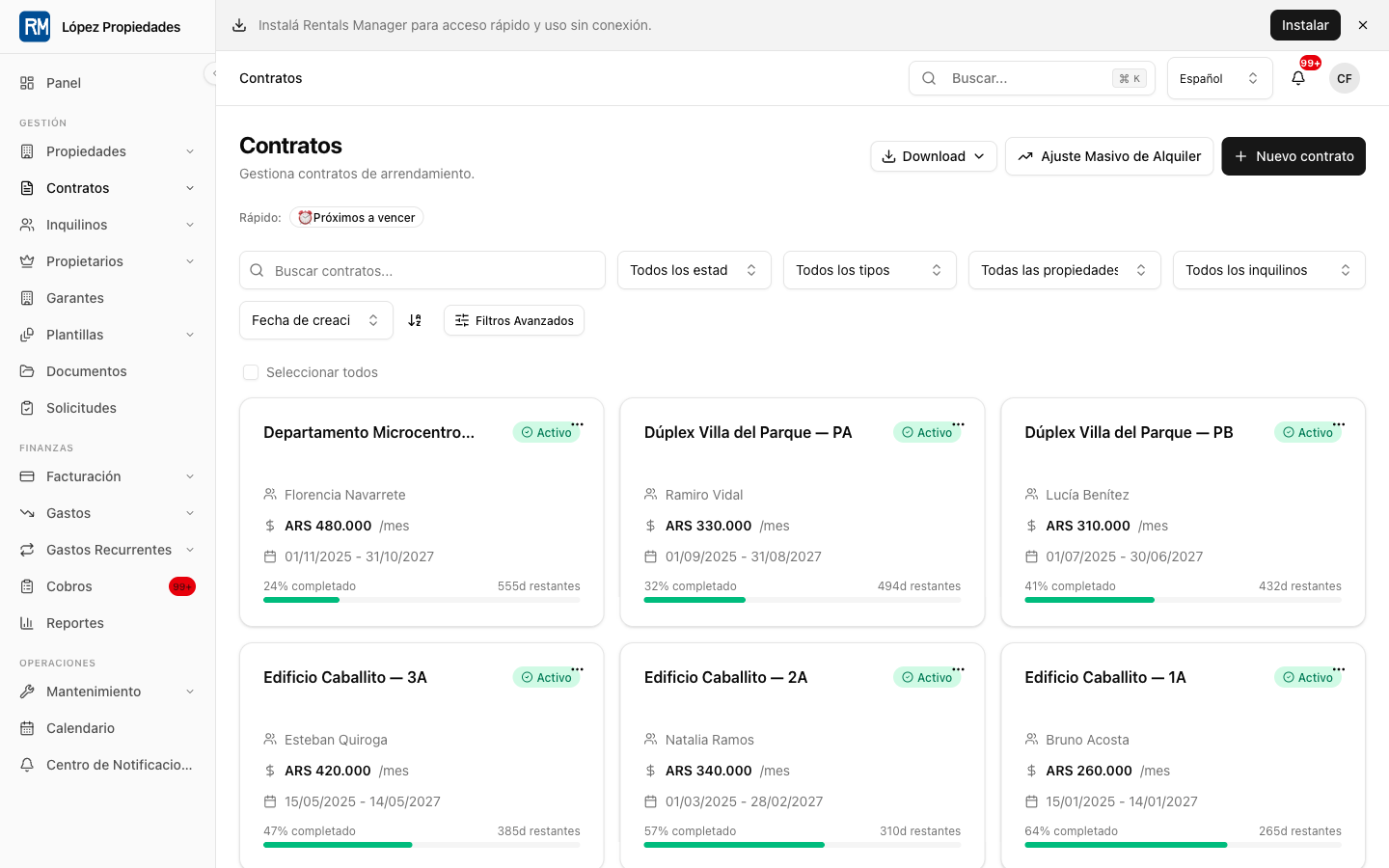
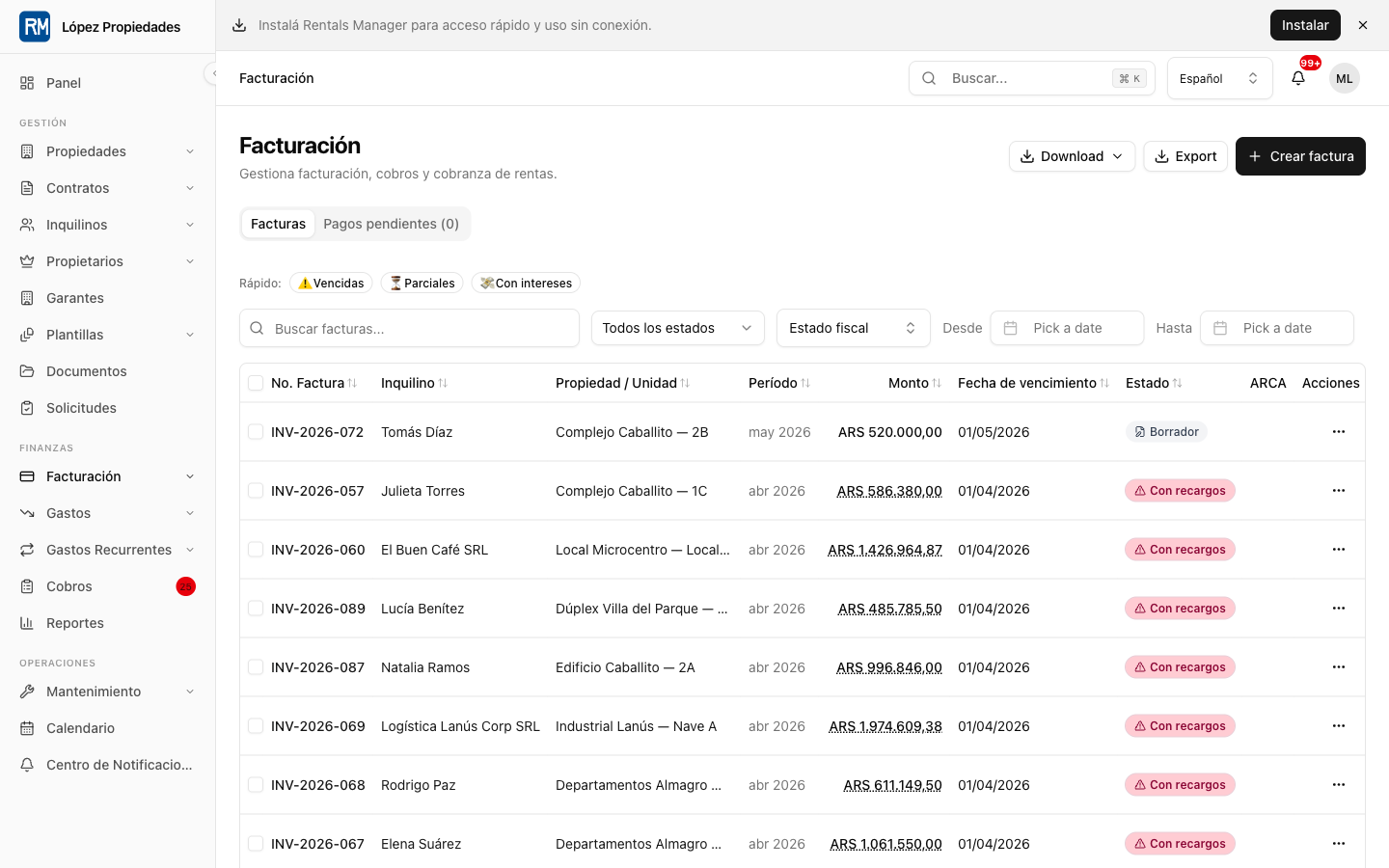
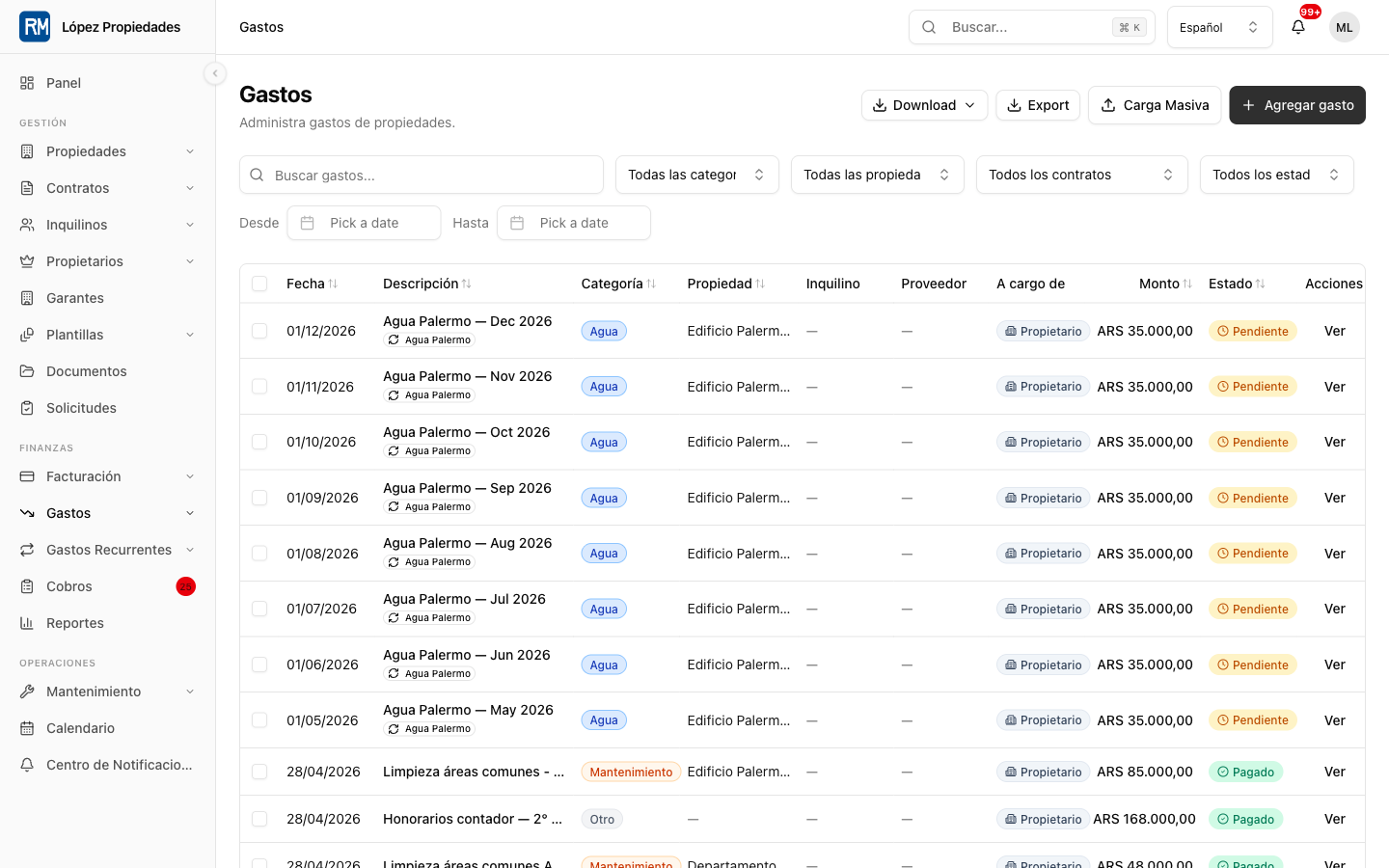
Visual Product Map
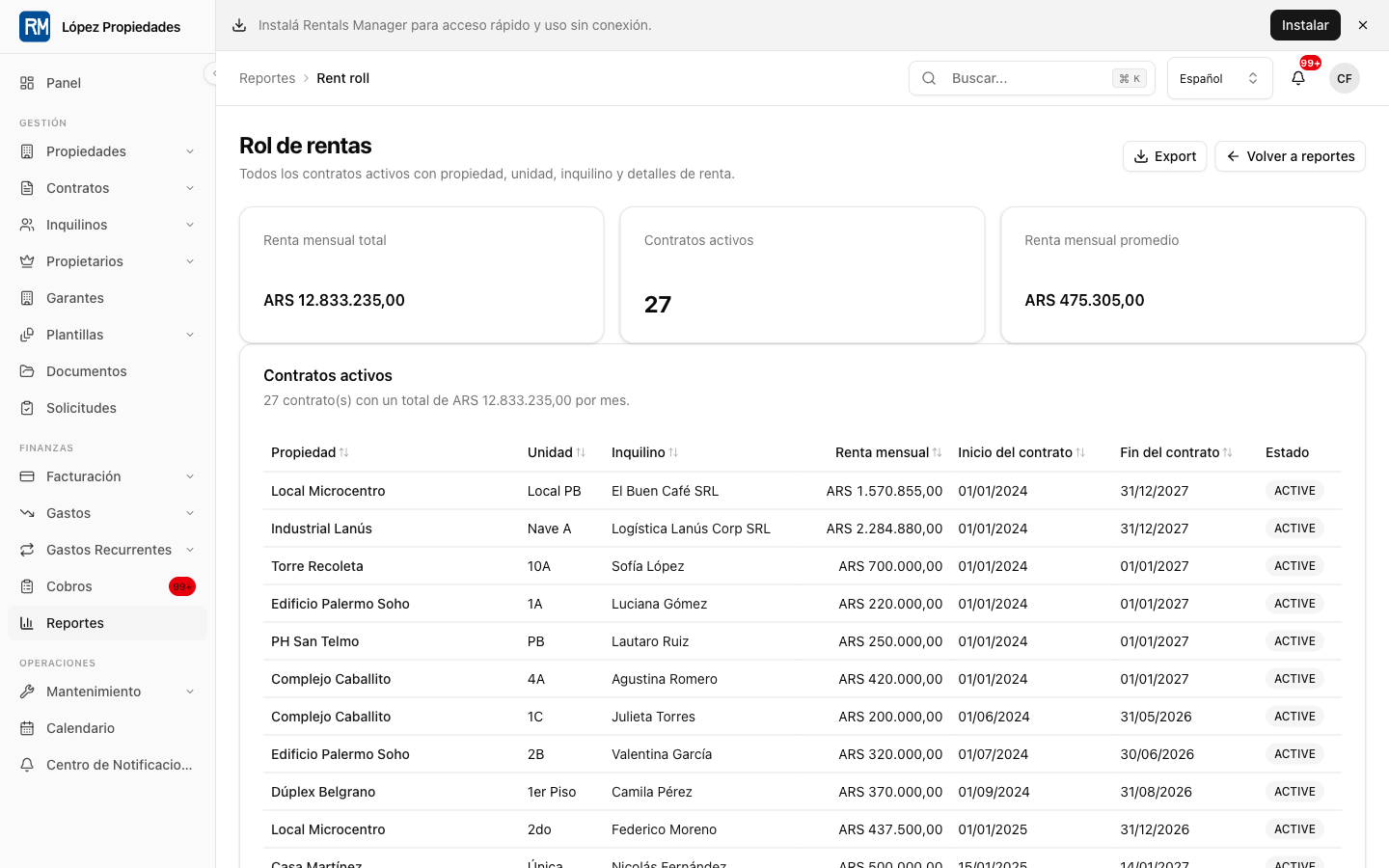
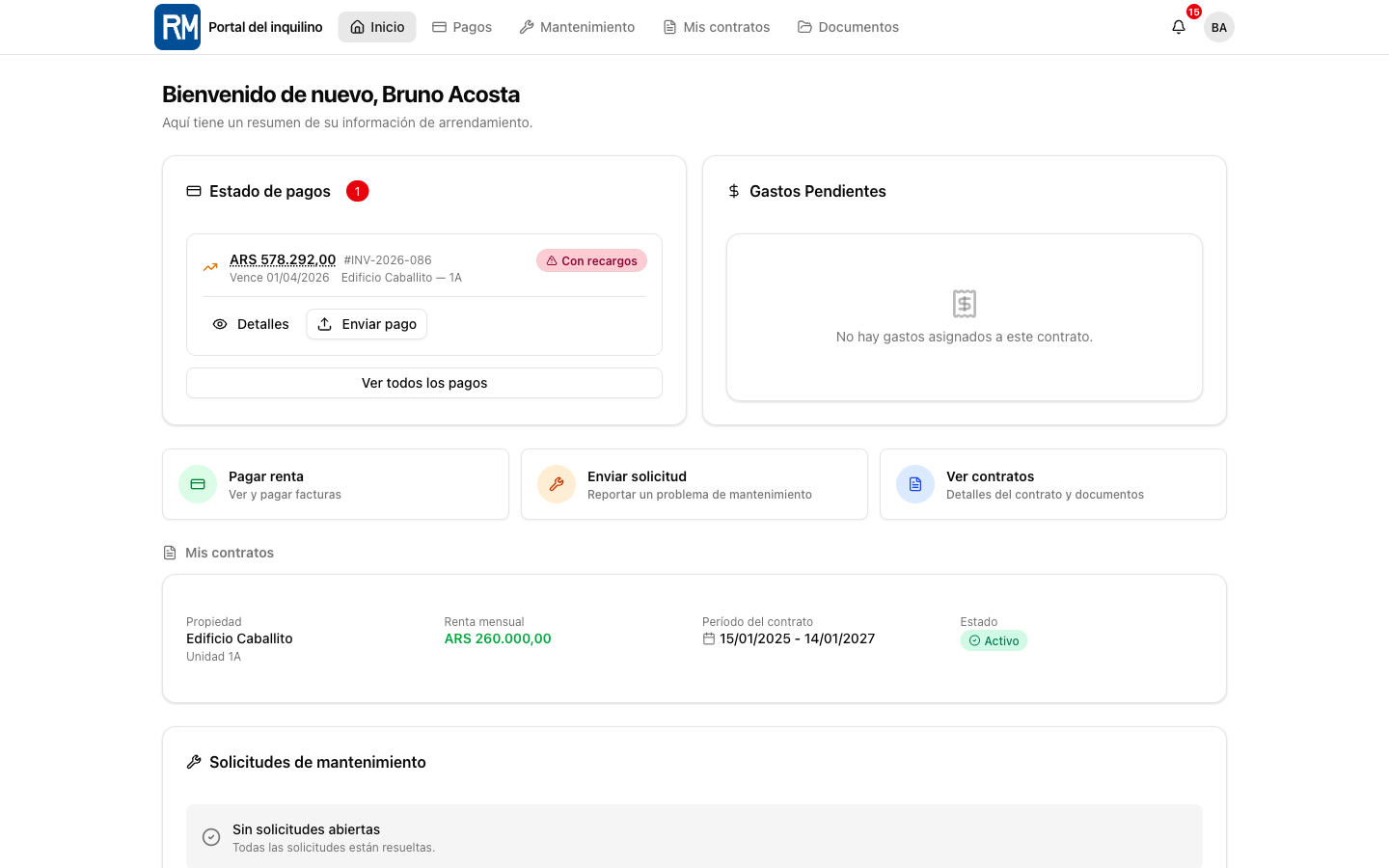
These public demo screenshots show the product surfaces that new employees and developers should understand before changing code. They use demo data and do not expose private customer information.
2. Main Application Surfaces
The app is organized by route groups under src/app/[locale]/.
| Surface | Route group | Main audience | Purpose |
|---|---|---|---|
| Landlord dashboard | (dashboard) |
Landlords, admins, managers, accountants, maintenance staff | Daily operations for properties, leases, payments, expenses, reports, settings, documents, and team work. |
| Tenant portal | (tenant-portal) |
Tenants | Lease self-service, payments, payment proof, maintenance, messages, documents, signatures, renewals, and profile settings. |
| Owner portal | (owner-portal) |
Property owners represented by an agency or manager | Read-only investment visibility: properties, leases, rent roll, financials, transactions, settlements, reports, expenses, and maintenance. |
| Prospect portal | (prospect-portal) |
Applicants and prospects | Application status, document upload, screening, and follow-up. |
| Public listings | (public-listing) |
Public visitors and applicants | Marketplace, agency listing hubs, subdomain listings, and property inquiry/application entry points. |
| Public site | (public) |
Visitors | Marketing pages, pricing, blog, legal pages, contact, and security pages. |
| Auth | (auth) |
All users | Login, registration, password reset, email verification, policy acceptance, and setup password. |
| Admin panel | (admin) |
Internal superadmins | Platform subscriptions, users, audit logs, cron controls, support surfaces, and monitoring. |
3. Technology Stack
| Layer | Technology |
|---|---|
| Web framework | Next.js App Router, React, TypeScript |
| UI | shadcn/ui, Radix UI, Tailwind CSS |
| Forms | React Hook Form plus Zod |
| Database | PostgreSQL through Prisma v7 adapters |
| Production database | Neon serverless PostgreSQL |
| Auth | Auth.js v5 with credentials, Google OAuth, magic links, JWT sessions, and 2FA |
| Background jobs | BullMQ workers backed by Redis |
| Storage | S3-compatible storage or MinIO |
| i18n | next-intl with English and Spanish messages |
| Payments | MercadoPago by default, Stripe optional |
| Email and messaging | Resend, SMTP, WhatsApp integrations, Web Push |
| Observability | Pino logs, Sentry, metrics endpoints |
| AI | Document and invoice extraction services |
4. Architecture in One Page
Renteric uses a layered architecture:
- The browser requests a localized route.
src/middleware.tshandles subdomain detection, locale, auth redirects, CSP, rate limits, cookie guards, and route-level access.- Server Components render read-heavy pages and call query functions.
- Client Components handle forms, interactive tables, filters, dialogs, and optimistic UI.
- Server Actions handle mutations. They validate input with Zod, enforce auth
and permissions, use the organization-scoped Prisma client, log/audit when
needed, revalidate affected routes, and return
ActionResult<T>. - API routes exist only for system boundaries: webhooks, cron triggers, file serving/uploads, integrations, metrics, search, and external callback flows.
- Background jobs run outside the web request path for scheduled billing, reminders, external sync, reporting, retention, and lifecycle transitions.
The default internal data flow is:
Server Component read -> src/server/queries/<domain>.ts -> getScopedDb()
Client form submit -> Server Action -> validator -> getScopedDb() -> ActionResult<T>
External system -> API route -> validated boundary -> service/action/job
Vercel cron -> API route -> BullMQ queue -> worker processor
Do not add REST endpoints for normal internal CRUD. Use Server Components for reads and Server Actions for writes.
5. Data Model and Multi-Tenancy
The core business chain is:
Organization -> Property -> Unit -> Lease -> Tenant
Important adjacent models include owners, guarantors, invoices, transactions, expenses, maintenance requests, vendors, inspections, documents, messages, notifications, receiving accounts, trust accounts, rental applications, and owner statements.
Every tenant-owned model has organizationId. Tenant isolation is enforced by
the org-scoped Prisma client in src/server/middleware/with-org-scope.ts.
Rules that must not be broken:
- Use
getScopedDb({ organizationId })or the scoped DB injected bycreateAction. - Never use the raw Prisma client for tenant-owned data in user-facing actions or queries.
- Let the scoped client inject
organizationIdand soft-delete filters. - Import Prisma types and
Prismafrom@/generated/prisma, not@prisma/client. - Use
Prisma.Decimalfor money. - Treat the following models as soft-deleted where applicable: Property, Unit, Tenant, Vendor, Guarantor, Owner, and related domain records that follow the soft-delete convention.
6. Auth, Roles, and Permissions
Auth state is carried in the session/JWT with user, organization, and role
context. Role and permission definitions live in src/config/permissions.ts.
Dashboard roles:
ADMIN: full organization-wide dashboard access.MANAGER: operational dashboard access, usually property-scoped.ACCOUNTANT: financial, reports, payment, and expense access.MAINTENANCE: maintenance, vendor, asset, inspection, and message access.
Portal roles:
TENANT: tenant portal only.OWNER: owner portal plus read-oriented owner visibility.
Mutation rules:
- Permission-gated CRUD should use
createActionfromsrc/lib/create-action.ts. - Use
withPermission,withPermissions,withAuth, orwithDashboardPermissionfor special cases. - Do not call
getAuthSession()directly inside a mutation as the only auth guard. - Always return
ActionResult<T>rather than throwing raw errors to the client.
7. Source Map
Use this map before opening large files:
| Area | Location |
|---|---|
| App routes | src/app/[locale]/ |
| API routes | src/app/api/ |
| Domain components | src/components/<domain>/ |
| UI primitives | src/components/ui/ |
| Server actions | src/server/actions/ |
| Server queries | src/server/queries/ |
| Zod validators | src/server/validators/ |
| Auth middleware | src/server/middleware/with-auth.ts |
| Org-scoped Prisma | src/server/middleware/with-org-scope.ts |
| Prisma client | src/lib/db.ts |
| Generated Prisma types | src/generated/prisma/ |
| Permissions | src/config/permissions.ts |
| Routes | src/config/routes.ts |
| Navigation | src/config/navigation.ts |
| Plans and feature flags | src/config/plans.ts |
| Jobs | src/server/jobs/ |
| i18n messages | messages/en.json, messages/es.json |
| Architecture docs | docs/architecture/ |
Do not read all of src/generated/prisma/index.d.ts. It is generated and very
large. Search for the specific type if needed.
8. How to Make a Change
Start with the smallest slice that preserves the existing architecture.
Find the domain. Search by route, component folder, server action, query, or validator.
Read the nearest existing pattern. Most domains already have CRUD pages, validators, forms, actions, queries, and tests. Follow the local pattern before inventing a new abstraction.
Update or add validation. Zod schemas live in
src/server/validators/<domain>.ts. Export the schema and its inferred type.Add the read path. Server Component pages should call query functions in
src/server/queries/<domain>.ts. Query functions receive organization context from the caller and use scoped DB access.Add the write path. Server Actions live in
src/server/actions/<domain>.tsor a domain subfolder. Validate external input, enforce permissions, use scoped DB, audit state changes, revalidate affected routes, and returnActionResult<T>.Add or update UI. Domain components live under
src/components/<domain>/. Use existing UI primitives fromsrc/components/ui/.Add i18n. Any user-visible text belongs in both
messages/en.jsonandmessages/es.json.Update routes, permissions, navigation, or plan gates if the change creates a new feature surface.
Add focused tests. Use unit tests for business-critical server behavior and Playwright only for end-to-end user workflows.
Update docs if the change affects architecture, setup, operations, or user behavior.
9. Forms
Most forms use React Hook Form and Zod.
- Use
translatedZodResolver(schema, tValidation)for i18n forms. - Use
typedZodResolver(schema)for non-translated forms. - Client-side validation improves UX, but server actions must re-validate input.
- Build
FormDatafrom validated data when calling server actions. - Display server-side
fieldErrorsinline when available.
Form flow:
useForm -> resolver -> handleSubmit -> FormData -> server action
server action -> schema.safeParse -> mutation -> ActionResult<T>
success -> toast + router.refresh/revalidate path
failure -> toast and/or form field errors
10. Background Jobs and Cron
Jobs live in src/server/jobs/ and are registered in
src/server/jobs/worker.ts. Vercel cron routes enqueue BullMQ work through
src/app/api/cron/*.
Use jobs for:
- Invoice generation.
- Late fees and interest warnings.
- Rent adjustments.
- Lease expiry and auto-expire transitions.
- Payment reminders, overdue notices, dunning, and collection escalation.
- Recurring expenses.
- Owner statements and scheduled reports.
- External sync such as economic indices, Tokko, ARCA, and exchange rates.
- File retention, data retention, and audit-log retention.
New jobs should be idempotent, logged, retry-aware, and safe to rerun.
11. External Integrations
Most integrations are wrapped behind service boundaries rather than being used directly from UI code.
Common integrations:
- MercadoPago and Stripe for payments and subscriptions.
- Resend, SMTP, Twilio, Meta WhatsApp, and Web Push for communication.
- ARCA/AFIP and BCRA for Argentina-specific tax and index workflows.
- S3/MinIO and ClamAV for file storage and virus scanning.
- Anthropic or other extraction services for document intelligence.
- Tokko and listing providers for real estate data sync.
- Sentry and metrics endpoints for production visibility.
Never commit API keys, tokens, certificates, or private data. Validate all webhook and API inputs at the boundary.
12. Local Development
Fast path:
make dev-up
make dev
Manual path:
docker compose up -d
npm install
npx prisma migrate deploy
npm run dev
Useful commands:
npm run worker
npm run lint
npm run test
npm run test:changed
npm run test:e2e
npm run build
npm run deploy
Use npm run deploy:prod only when explicitly told to deploy production.
13. Verification Expectations
Choose verification based on risk.
- Documentation-only: run a formatter or markdown sanity check.
- Validator/action changes: run focused unit tests.
- Shared server behavior: run affected unit tests plus lint or typecheck/build when practical.
- User workflow changes: run Playwright for the affected path.
- Background jobs: run focused tests and, when possible, a dry-run or local worker check.
Do not claim work is complete until verification has actually run or you clearly state what could not be run.
14. Paperclip Workflow
Paperclip is the agent operating system used to coordinate work. The board or a manager creates goals and issues. Agents pick up assigned issues, work in heartbeats, leave durable comments or artifacts, and move issues to a clear status.
Issue statuses:
todo: ready but not currently owned.in_progress: actively being worked.in_review: waiting on a real reviewer, approval, interaction, or monitor.blocked: cannot continue until a named owner or blocker issue acts.done: complete, verified, and no follow-up remains.cancelled: intentionally abandoned.
Agent rules:
- Work only on assigned issues unless explicitly mentioned and handed off.
- Checkout before working unless the harness already checked out the issue.
- Do not switch issues mid-heartbeat.
- Use comments for traceability: status line, bullets, links, verification.
- Use child issues for work that is long, parallel, or owned by another agent.
- Use first-class blockers rather than free-text blocker comments when one issue blocks another.
- Mark
doneonly when the requested work is complete.
15. How to Create Good Paperclip Issues
Create an issue when work needs a durable owner, review path, or audit trail. Good issues are specific enough for an agent to execute without guessing.
Include:
- Clear title with the user-visible outcome.
- Business reason or source context.
- Scope: what is included and what is out of scope.
- Relevant files, routes, or docs.
- Acceptance criteria.
- Verification required.
- Dependencies or blockers.
- Suggested owner or skill profile when known.
Example issue body:
## Goal

Add CSV export for owner settlement summaries so property managers can send
monthly accounting data to external accountants.

## Scope

- Add export action to the owner settlement domain.
- Include owner, property, period, gross rent, expenses, fees, and net payout.
- Add a button on the owner settlement detail page.
- Reuse existing export patterns.

## Out of Scope

- New report charts.
- Changes to settlement calculations.

## Acceptance Criteria

- Export is available only to users with report/financial access.
- CSV rows are organization-scoped.
- Empty states and errors are translated in English and Spanish.
- Focused unit tests cover permissions and exported columns.

## Verification

- Run focused unit tests for owner settlement export.
- Run lint on changed files.
When referencing another issue in comments or descriptions, use a clickable
internal link with the company prefix, for example
[REN-123](/REN/issues/REN-123).
16. Review Checklist for Code Changes
Before handing work off:
- Multi-tenancy: no raw Prisma access to tenant-owned data.
- Auth: every mutation is guarded.
- Type safety: no new
any, Prisma imports from@/generated/prisma. - Validation: all external input is parsed with Zod.
- Money: use decimals, not floating point arithmetic.
- Performance: no unbounded queries or N+1 loops.
- Security: no secrets, raw HTML, stack traces, or unvalidated uploads.
- Audit: state-changing mutations log audit entries where expected.
- i18n: user-visible strings exist in English and Spanish.
- Tests: focused tests or documented verification.
- Deployment: after a clean commit, run
npm run deployfor a preview unless explicitly told otherwise.
17. When You Are Unsure
Use the existing codebase as the first authority:
- Search for a similar domain.
- Read the validator, query, action, component, and test together.
- Prefer small changes that fit the established pattern.
- Escalate strategic, budget, irreversible, or product-direction questions to the board instead of inventing direction.